1.全種類
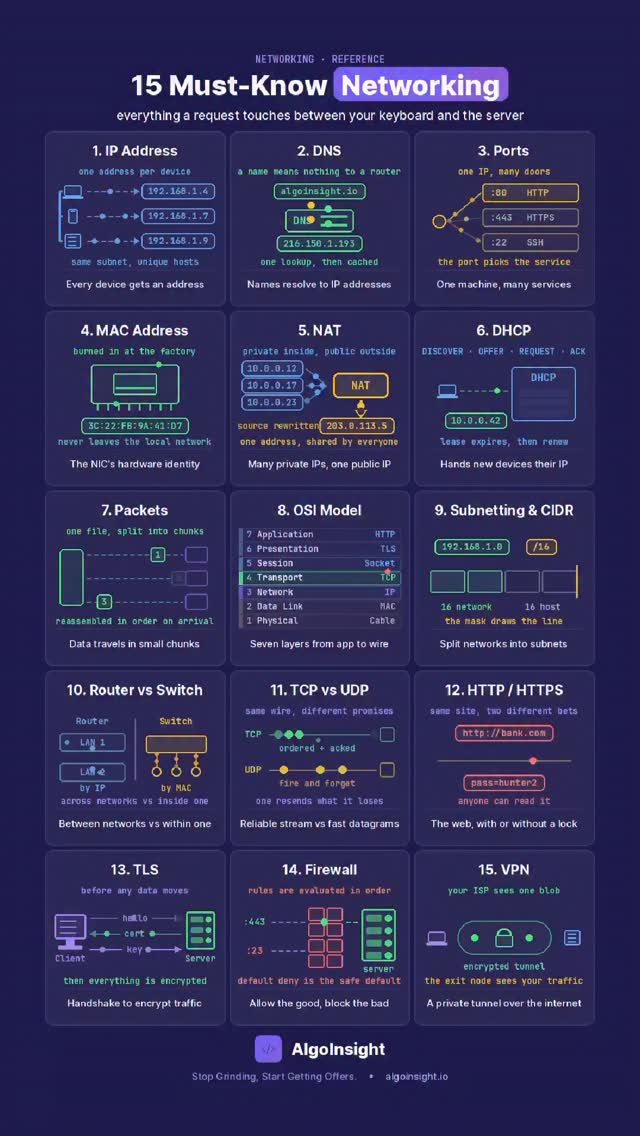
| 1.IP Address | 1. IP Address – unique within its subnet 1. IPアドレス – サブネット内で一意 |
| 2.DNS | 2. DNS – names resolve to IPs, then cache 2. DNS – 名前はIPアドレスに解決され、その後キャッシュされる |
| 3.Ports | 3. Ports – one IP, many doors (:80, :443, :22) 3. ポート – 1つのIPアドレスで、多くのポート (:80、:443、:22) |
| 4.MAC Address | 4. MAC – burned into the NIC, never leaves the LAN 4. MACアドレス – NICに焼き付けられ、LANから出ることはない |
| 5.NAT | 5. NAT – many private IPs, one public 5. NAT – 多数のプライベートIPアドレスと1つのパブリックIPアドレス |
| 6.DHCP | 6. DHCP – DISCOVER, OFFER, REQUEST, ACK 6. DHCP – DISCOVER、OFFER、REQUEST、ACK |
| 7.Packets | 7. Packets – split up, reassembled in order 7. パケット – 分割され、順番に再構成される |
| 8.OSI Model | 8. OSI Model – 7 layers, app down to cable 8. OSIモデル – 7層、アプリケーションからケーブルまで |
| 9.Subnetting & CIDR | 9. Subnetting – the mask splits network from host 9. サブネット化 – マスクによってネットワークとホストが分離される |
| 10.Router vs Switch | 10. Router vs Switch – by IP vs by MAC 10. ルーターとスイッチ – IPアドレス によるかMACアドレスによるか |
| 11.TCP vs UDP | 11. TCP vs UDP – acked stream vs fire and forget 11. TCPとUDP – ACK付きストリームか、送信して忘れる方式か |
| 12.HTTP /HTTPS | 12. HTTP vs HTTPS – with or without a lock 12. HTTPとHTTPS – ロックの有無 |
| 13.TLS | 13. TLS – hello, cert, key, THEN data 13. TLS – hello、cert、key、そしてデータ |
| 14.Firewall | 14. Firewall – rules in order, default deny 14. ファイアウォール – ルールは順番に、デフォルトは拒否 |
| 15.VPN | 15. VPN – a tunnel (the exit node still sees you) 15. VPN – トンネル (出口ノードは依然としてあなたを認識している) |
2.解説
| 1. IP vs MAC is the most confused pair in networking. IP says WHERE you are on the internet. MAC says WHICH physical card you are on this cable. IP is routable and changes as you move networks. MAC is fixed and never crosses a router. Every packet carries both – and the MAC is rewritten at every hop while the IP stays put. Get that and routers, switches, ARP and traceroute all click at once. 用語の解説 IP はインターネット上のどこにいるかを示す MAC はこのケーブル上のどの物理カードであるかを示す IP はルーティング可能で、ネットワークを移動すると変わる MAC は固定されており、ルーターを通過することはない 全てのパケットには両方が含まれており、 MAC はホップごとに書き換えられる IP はそのままで書き換えられない |
| 2. Most of this list is caching or translation in disguise. DNS caches name to IP. ARP caches IP to MAC. NAT translates and keeps a table to translate replies back. DHCP leases and remembers. 15 items, 3 ideas. リストのほとんどは、偽装されたキャッシュまたは変換 DNS は名前を IP にキャッシュする ARP は IP を MAC にキャッシュdする NAT は変換し、返信を変換するためのテーブルを保持する DHCP はリースして記憶する |
| 3. The security ones work at DIFFERENT layers – that’s why you need several. A firewall filters ports and addresses. TLS encrypts payloads. A VPN wraps the lot. None replaces the others: a firewall can’t see inside TLS, TLS doesn’t hide WHO you’re talking to, and a VPN just moves the trust boundary to whoever runs the exit node. セキュリティー セキュリティ関連のものは、異なるレイヤーで動作し、複数必要 ファイアウォールはポートとアドレスをフィルタリングする TLS はペイロードを暗号化する VPN は全体をラップする どれも他のレイヤーに取って代わるものではない ファイアウォールはTLSの内部を見ることはできない TLSは通信相手を隠すこともできない VPNは信頼の境界を出口ノードを運用する側に移すだけ |
| Every layer exists to translate between two things that don’t speak the same language. すべてのレイヤーは、同じ言語を話さない2つのものの間を翻訳する |